Инструкция для Vitek VT-4024
 1
 2
 3
 4
 5
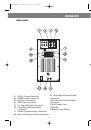 6
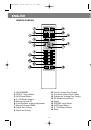 7
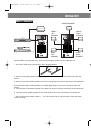 8
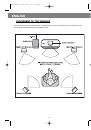 9
 10
 11
 12
 13
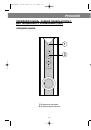 14
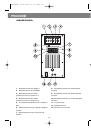 15
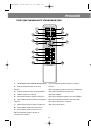 16
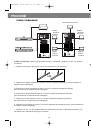 17
 18
 19
 20

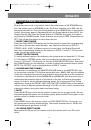
OPERATING SYSTEM INSTRUCTIONS
1.
ON/OFF
Plug in the power cord to the outlet, switch the main power to ON/STANDBY posi-
tion, the system goes to STANDBY mode. The Power Indicator turns RED, the dis-
play panel remains off. Press the Power button or the STANDBY key on the remote
control, the system goes to Operation Mode, the Power Indicator turns BLUE, the
Display Panel is ON. Press the Power Button or STANDBY key again, the system
goes back to STANDBY mode, Power Indicator turns back to RED, Display Panel is
OFF. Turn off the main switch to shut down the unit.
2.
SELECT INPUT MODE
Press the PUSH SELECTOR button on the front panel (or press the corresponding
input key on the remote control directly), can select from the loop of DVD/5.1,
STEREO, AUX1, AUX2, 4 different source of sound input, the Display Panel will
have the corresponding display for the selection. DVD/5.1 is the 5.1 CH surround
mode, the rest are stereo mode.
3.
SELECT OUTPUT MODE
To satisfy different desire of the listening, the system does not have the 2.1 CH and
5.1 CH switch in STEREO mode, user can use the key on the remote control to
chose 2.1 CH and 5.1 CH directly (or hold the PUSH SELECTOR button, then push
the POWER button) for the selection, in order to select the preferred music sound.
NOTE: The OUTPUT mode is disabled when in DVD/5.1 mode
4.
VOLUME AND FINE TUNING
The volume is controlled by the MASTER VOLUME knob or the MASTER VOL key
on the remote controller. The Volume level adjust from -80dB~0dB, and the display
shows the corresponding volume level indicator, when the volume at the maximum
or minimum, the indicator shows MAXIMUM and MINIMUM, this allows the user to
understand the operation status of the status of the unit, and ensure the proper
usage, In order to satisfy different listening desire, the unit have the Fine Tuning
adjustment, through the FRONT, CEN, SUR, SW, TRE and BASS key on the remote
control, user can adjust between the range of ±7dB, for front, center, surround and
subwoofer volume, along with treble and bass tuning.
5.
MUTE
Press the MUTE key on the remote control, system goes in to mute mode, the cor-
responding indicator shows on the display panel, press the MUTE key again on the
remote control to disable the mute mode.
6.
RESET
Press RESET key on the remote control, or PUSH SELECTOR for 5 seconds, sys-
tem goes back to factory default setting. The master volume back to -30dB, and
all the adjustments goes back to 0 dB.
7.
3D SOUND EFFECT MODE
When press the 3D key on the remote control, the system turns into 3D sound
effect.
9
ENGLISH
4024.qxd 27.08.2004 16:39 Page 9
Оглавление инструкции
- Страница 1 из 21
4024.qxd 27.08.2004 16:39 Page 2
- Страница 2 из 21
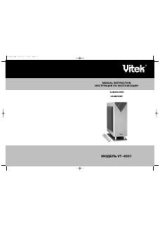
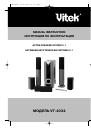
4024.qxd 27.08.2004 16:39 Page 3 MANUAL INSTRUCTION ÈÍÑÒÐÓÊÖÈß ÏÎ ÝÊÑÏËÓÀÒÀÖÈÈ ACTIVE SPEAKER SYSTEM 5.1 ÀÊÒÈÂÍÀß ÀÊÓÑÒÈ×ÅÑÊÀß ÑÈÑÒÅÌÀ 5.1 ÌÎÄÅËÜ VT-4024
- Страница 3 из 21
4024.qxd 27.08.2004 16:39 Page 2 ENGLISH SAFETY PRECAUTION 1. To avoid shock hazard or damage to the unit, do not attempt to remove the cover or the rear panel. All servicing should be referred to qualified service personnel. 2. To avoid hight heat, do not place the unit directly under the sun, and
- Страница 4 из 21
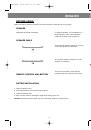
4024.qxd 27.08.2004 16:39 Page 3 ENGLISH BEFORE USING Please unwrap the packing carefully, and save the packing materials for future usage. SPEAKER Subwoofer with built-in amplifier 5. satellite speakers, 2 Front Speakers, 2 Rear Speakers, and 1 Center Speaker (Label on the back of each speaker)
- Страница 5 из 21
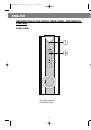
4024.qxd 27.08.2004 16:39 Page 4 ENGLISH DESCRIPTION OF THE FRONT, REAR PANEL, AND REMOTE CONTROL FRONT PANEL 1. Power Indicator 2. Display Panel 4
- Страница 6 из 21
4024.qxd 27.08.2004 16:39 Page 5 ENGLISH REAR PANEL 1. 2. 3. 4. 5. 6. DVD/5.1 Input Connector STEREO Input Connector AUXl Input Connector AUX2 Input Connector 5.1 9-pin DIN Input Connector Front-Right Channel Output Connector 7. Center Channel Output Connector 8. Rear-Left Channel Output Connector
- Страница 7 из 21
4024.qxd 27.08.2004 16:39 Page 6 ENGLISH REMOTE CONTROL 10. Center Volume Fine Tuning 11. Surround Volume Fine Tuning 12. Subwoofer Volume Fine Tuning 13. 3D Mode Sound Effect 14. Reset 15. STEREO Input Select 16. AUX2 Input Select 17. 5.1 CH Mode Output 18. Mute 1.ON/STANDBY 2. DVD/5.1 Input
- Страница 8 из 21
4024.qxd 27.08.2004 16:39 Page 7 ENGLISH CONNECTIONS CENTER SPEAKER FRONT / LEFT SPEAKER FRONT / RIGHT SPEAKER REAR / LEFT SPEAKER REAR / RIGHT SPEAKER Caution: Make sure the power is off, when connect satellite speakers to the subwoofer unit 1. Cut off the cable coating and twist the wire.
- Страница 9 из 21
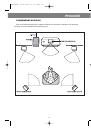
4024.qxd 27.08.2004 16:39 Page 8 ENGLISH PLACEMENT OF THE SPEAKER Place and connect the speakers with 5.1 CH DVD player, or other sound devices, can get the best 5.1 surround sound effect.Refer to the diagram below: 8
- Страница 10 из 21
4024.qxd 27.08.2004 16:39 Page 9 ENGLISH OPERATING SYSTEM INSTRUCTIONS 1. ON/OFF Plug in the power cord to the outlet, switch the main power to ON/STANDBY position, the system goes to STANDBY mode. The Power Indicator turns RED, the display panel remains off. Press the Power button or the STANDBY
- Страница 11 из 21
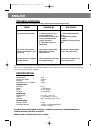
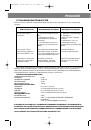
4024.qxd 27.08.2004 16:39 Page 10 ENGLISH TROUBLE SHOOTING If the system do not operate correctly, please do the following check up ISSUE CAUSED BY SOLUTION No Sound from Speaker 1. System does not connected with power. 2. The speaker cables are not connected with the output connector 3. The power
- Страница 12 из 21
4024.qxd 27.08.2004 16:39 Page 11 ÐÓÑÑÊÈÉ ÌÅÐÛ ÏÐÅÄÎÑÒÎÐÎÆÍÎÑÒÈ ÏÐÅÄÓÏÐÅÆÄÅÍÈÅ: Âî èçáåæàíèå ïîæàðà èëè ïîðàæåíèÿ ýëåêòðè÷åñêèì òîêîì, íå ïîäâåðãàéòå àïïàðàò âîçäåéñòâèþ äîæäÿ èëè âëàãè. Çíàê â âèäå âñïûøêè ìîëíèè ñî ñòðåëêîé, ðàñïîëîæåííûé âíóòðè ðàâíîñòîðîííåãî òðåóãîëüíèêà, ïðåäóïðåæäàåò
- Страница 13 из 21
4024.qxd 27.08.2004 16:39 Page 12 ÐÓÑÑÊÈÉ ÏÅÐÅÄ ÏÅÐÂÛÌ ÂÊËÞ×ÅÍÈÅÌ Àêêóðàòíî ðàñêðîéòå óïàêîâêó è ñîõðàíèòå åå íà ïåðèîä ãàðàíòèéíîãî ñðîêà. ÊÎËÎÍÊÈ Êîìïëåêò èç 5 êîëîíîê: öåíòðàëüíàÿ êîëîíêà, äâå ïåðåäíèõ è äâå çàäíèõ (íà êàæäîé êîëîíêå èìååòñÿ ñîîòâåòñòâóþùàÿ ýòèêåòêà) Ñàáâóôåð ñî âñòðîåííûì
- Страница 14 из 21
4024.qxd 27.08.2004 16:39 Page 13 ÐÓÑÑÊÈÉ ÏÅÐÅÄÍßß ÏÀÍÅËÜ, ÇÀÄÍßß ÏÀÍÅËÜ È ÏÓËÜÒ ÄÈÑÒÀÍÖÈÎÍÍÎÃÎ ÓÏÐÀÂËÅÍÈß (ÏÄÓ) ÏÅÐÅÄÍßß ÏÀÍÅËÜ 1.Èíäèêàòîð ïèòàíèÿ 2. Èíäèêàòîðíàÿ ïàíåëü 13
- Страница 15 из 21
4024.qxd 27.08.2004 16:39 Page 14 ÐÓÑÑÊÈÉ ÇÀÄÍßß ÏÀÍÅËÜ 1. Âõîäíîé ðàçúåì äëÿ DVD/5.1 8. Âûõîäíîé ðàçúåì äëÿ ëåâîé çàäíåé 2. Âõîäíîé ðàçúåì äëÿ STEREO êîëîíêè 3. Âõîäíîé ðàçúåì äëÿ AUX1 9. Âûõîäíîé ðàçúåì äëÿ ïðàâîé çàäíåé (äîïîëíèòåëüíîãî óñòðîéñòâà 1) êîëîíêè 4. Âõîäíîé ðàçúåì äëÿ AUX2 10.
- Страница 16 из 21
4024.qxd 27.08.2004 16:39 Page 15 ÐÓÑÑÊÈÉ ÏÓËÜÒ ÄÈÑÒÀÍÖÈÎÍÍÎÃÎ ÓÏÐÀÂËÅÍÈß (ÏÄÓ) 1. ON/STANDBY (ÂÊË/ÐÅÆÈÌ ÎÆÈÄÀÍÈß) 11. Ðåãóëèðîâêà óðîâíÿ ãðîìêîñòè çàäíèõ 2. Êíîïêà âûáîðà âõîäíîãî ñèãíàëà êîëîíîê DVD/5.1 12. Ðåãóëèðîâêà óðîâíÿ ãðîìêîñòè ñàáâóôåðà 3. Êíîïêà âûáîðà âõîäíîãî ñèãíàëà AUX1 13. Ðåæèì
- Страница 17 из 21
4024.qxd 27.08.2004 16:39 Page 16 ÐÓÑÑÊÈÉ ÑÕÅÌÀ ÑÎÅÄÈÍÅÍÈÉ Öåíòðàëüíàÿ êîëîíêà Ëåâàÿ ïåðåäíÿÿ êîëîíêà Ëåâàÿ çàäíÿÿ êîëîíêà Ïðàâàÿ ïåðåäíÿÿ êîëîíêà Ïðàâàÿ çàäíÿÿ êîëîíêà ÏÐÅÄÎÑÒÅÐÅÆÅÍÈÅ: ïåðåä ïîäêëþ÷åíèåì êîëîíîê ê ñàáâóôåðó, óáåäèòåñü â òîì, ÷òî ïèòàíèå îòêëþ÷åíî. 1. Ñíèìèòå èçîëÿöèþ ñ ïðîâîäîâ è
- Страница 18 из 21
4024.qxd 27.08.2004 16:39 Page 17 ÐÓÑÑÊÈÉ ÐÀÇÌÅÙÅÍÈÅ ÊÎËÎÍÎÊ Äëÿ ïîëó÷åíèÿ ìàêñèìàëüíîãî ýôôåêòà îáúåìíîãî çâó÷àíèÿ óñòàíîâèòå àêóñòè÷åñêóþ ñèñòåìó ñîãëàñíî ïðèâåäåííîìó íèæå ðèñóíêó: 17
- Страница 19 из 21
4024.qxd 27.08.2004 16:39 Page 18 ÐÓÑÑÊÈÉ ÈÍÑÒÐÓÊÖÈÈ ÏÎ ÐÀÁÎÒÅ Ñ ÀÊÓÑÒÈ×ÅÑÊÎÉ ÑÈÑÒÅÌÎÉ 1. ON/OFF (ÂÊË/ÂÛÊË) Âñòàâüòå âèëêó ñåòåâîãî øíóðà â ðîçåòêó, óñòàíîâèòå ñåòåâîé âûêëþ÷àòåëü â ïîëîæåíèå ON/STANDBY (ÂÊË/ÐÅÆÈÌ ÎÆÈÄÀÍÈß) - ñèñòåìà ðàáîòàåò â ðåæèìå îæèäàíèÿ. Ïðè ýòîì èíäèêàòîð ïèòàíèÿ çàãîðèòñÿ
- Страница 20 из 21
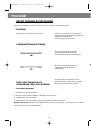
4024.qxd 27.08.2004 16:39 Page 19 ÐÓÑÑÊÈÉ ÓÑÒÐÀÍÅÍÈÅ ÍÅÈÑÏÐÀÂÍÎÑÒÅÉ Åñëè ñèñòåìà íå ðàáîòàåò íàäëåæàùèì îáðàçîì, âûïîëíèòå ïðîâåðêó ñîãëàñíî ñëåäóþùåé òàáëèöå: ÍÅÈÑÏÐÀÂÍÎÑÒÜ ÂÎÇÌÎÆÍÛÅ ÏÐÈ×ÈÍÛ ÌÅÒÎÄÛ ÓÑÒÐÀÍÅÍÈß Îòñóòñòâóåò çâóê â êîëîíêàõ 1. Ñèñòåìà íå ïîäêëþ÷åíà ê ñåòè 2. Ïðîâîäà êîëîíîê íå
- Страница 21 из 21